
Figma is narrowing one of product design’s most persistent gaps: the difference between a layout that looks correct on the canvas and the CSS an engineer needs to reproduce it in the browser.
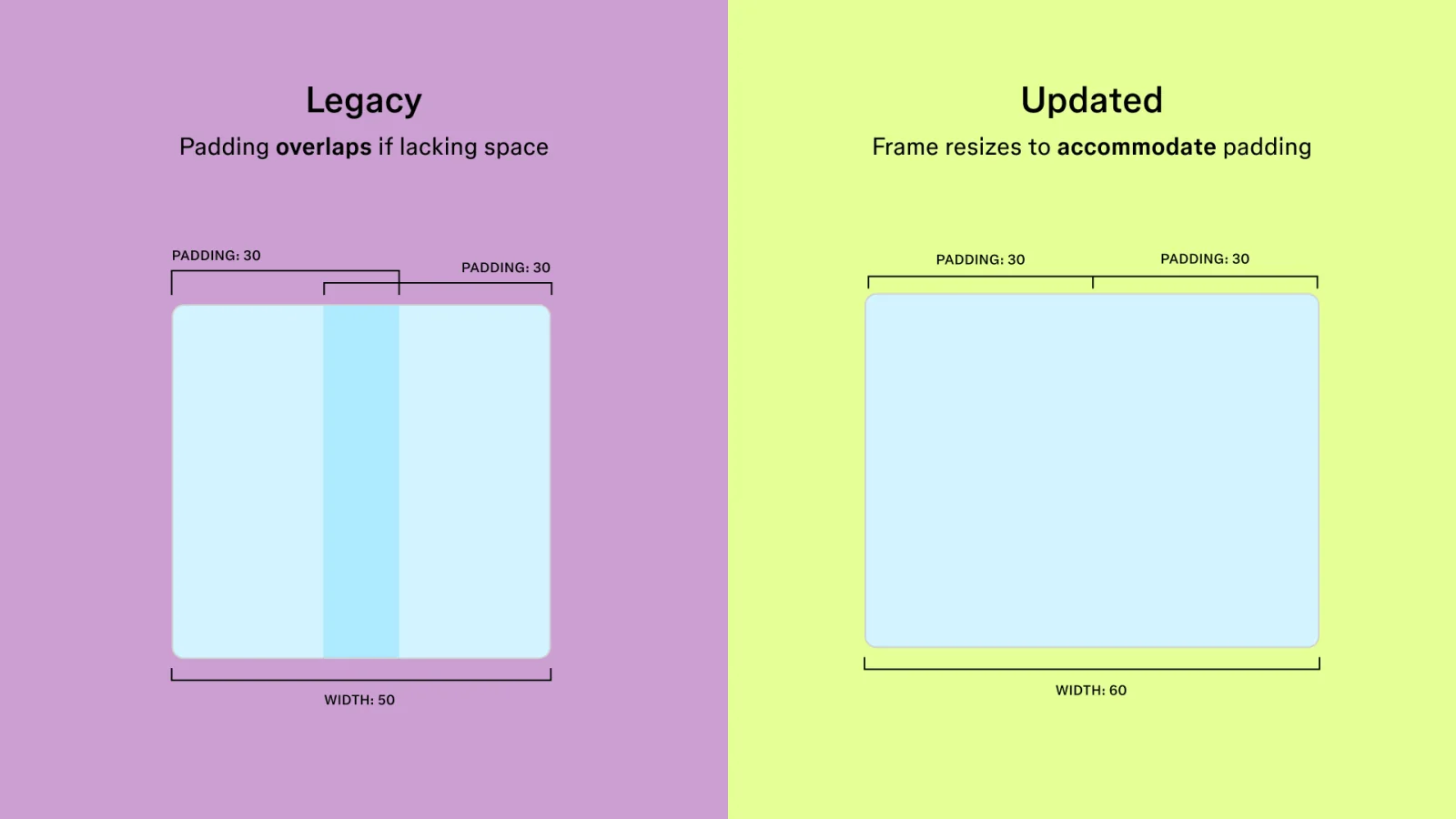
An auto layout update released on July 24 changes how new frames handle layout so their behavior aligns more closely with CSS. Figma says the update reduces workarounds that developers previously needed during handoff. Existing frames remain on the legacy system unless a team chooses to update them, while new frames use the revised behavior automatically.
It is a focused release, but it points to a much larger change. Design tools are moving beyond static specification and becoming active environments where visual decisions, system variables, code, motion, and implementation context can remain connected.
Why a layout update matters
Auto layout has long helped designers express responsive relationships instead of positioning every element by hand. The trouble begins when its rules differ subtly from the browser’s layout model. Small mismatches in sizing, alignment, wrapping, or positioning can force engineers to rebuild the intended behavior rather than translate it directly.
Bringing the canvas closer to CSS gives both disciplines a more shared mental model. Designers can make decisions inside constraints that resemble the final medium, while developers receive an artifact that requires less interpretation.
Figma is keeping the transition reversible. Teams can continue using the legacy version for existing work and switch back until January 2027, providing time to evaluate the effect on established files and design systems.
Code-backed screens retain more design intelligence
The layout change follows another July update aimed at the reverse journey: bringing implemented interfaces back onto the design canvas.
When teams import code-backed screens through a Figma Make preview, the Figma MCP server, or the company’s Chrome extension, colors, typography, and spacing can now bind to variables already present in the file instead of arriving mainly as hardcoded values. Figma also says more imported frames arrive with auto layout.
That distinction is important. An editable screenshot is useful for reference, but an editable screen connected to tokens and responsive rules can re-enter the design system. It supports iteration rather than simply documenting what has already shipped.
The canvas is becoming a production surface
Figma’s Config 2026 announcements make the direction explicit. Code layers are designed to let teams turn a visual layer into interactive code, explore multiple coded directions side by side, and move selected work back into editable design layers.
Figma Motion adds a timeline, keyframes, presets, and inspectable animation values to the same files that hold components and variables. Motion can be exported in formats including CSS, JSON, React, MP4, WebM, animated SVG, and GIF.
Shader fills and effects bring programmable visual materials to the canvas, while generative plugins let teams describe a custom tool and its controls without first creating a local development environment. Figma Weave adds reusable, node-based generative workflows for images, video, and other visual media.
What changes for product teams
The opportunity is not to eliminate handoff with another button. It is to replace a one-way handoff with a loop. A product can move from canvas to code, return as editable structure, preserve more of its variables, and continue evolving with design and engineering context attached.
- Design systems can cover behavior and motion as well as color, type, and spacing.
- Engineers can spend less time decoding layout approximations and more time validating real product behavior.
- Designers can explore interactive ideas earlier without separating every experiment from the shared file.
- Agents can operate with the team’s actual components, variables, and workflow instructions instead of generic visual assumptions.
Convergence still needs judgment
A shared canvas does not make design and engineering interchangeable. Production interfaces still need semantic HTML, accessibility, performance discipline, robust state handling, security, and testing across real content and devices. A generated shader or code layer can accelerate exploration without proving that the result belongs in a shipped product.
Teams will also need to decide which experiments become durable system primitives. If every file accumulates one-off motion, generated tools, and coded effects, a more capable canvas can create inconsistency as quickly as it creates freedom.
The strongest workflow will keep human judgment visible: designers define intent and quality, engineers define runtime integrity, and both disciplines decide which rules should become reusable.
A more continuous design process
The latest auto layout release is good news because it addresses a practical source of friction rather than adding spectacle for its own sake. Better alignment with CSS can make everyday collaboration clearer even for teams that never use an agent, shader, or generative workflow.
Taken together with code-aware imports and the Config releases, it also signals where design technology is heading. The canvas is becoming less like a picture of a future product and more like a connected workspace where the product can be explored, expressed, implemented, and revised.