Everyday access
Money records stay available on the device, with optional cloud backup after sign-in.
A personal money manager that helps people record daily activity, understand the month, and plan what comes next.
What we made, why it mattered, and how it came together.
Cires began with a simple problem: a balance shows what is left, but not how the month took shape.
People can record income, spending, transfers, bills, and savings in one place. Cires then connects those entries to accounts, budgets, goals, and reports, making it easier to see patterns and decide what to do next.
The product works across iOS and Android, keeps its core records on the device, and offers optional cloud backup. It also includes multiple currencies, home-screen widgets, reports, reminders, personal themes, and a website built around the story of a month in review.
Money records stay available on the device, with optional cloud backup after sign-in.
Cires supports major languages, right-to-left layouts, and local date, number, and currency formats.
Light, dark, AMOLED, font, icon, and color choices let people shape the app without changing how it works.
Balance, budget, bill, goal, and quick-action widgets keep useful information close by.
A useful money manager must keep financial records accurate. Transfers should not look like spending, exchange rates must keep their original context, fees need to remain separate, and older reports should not change when today's rates change.
Daily use still needs to feel quick. Adding a coffee, approving a bill, checking a budget, or moving money between currencies should not feel like bookkeeping.
Cires also needed to work well without a required account, support different regions, and offer broad visual choice without making the interface inconsistent.
What we had to balance
Accurate records versus fast entry
On-device records versus optional sign-in and backup
Many features versus clear navigation
Personal choice versus consistent controls
Regional formats versus dependable records
Helpful motivation versus pressure or guilt
Quick widgets versus reliable startup behavior
Our approach
The experience follows a simple rhythm. Record what happened, connect those entries into a pattern, then use that pattern to make the next plan.
Transactions form the record. Accounts, budgets, goals, and reports explain it. Limits, reminders, recurring approvals, and goal contributions turn that understanding into action.
The brand follows the same idea. Coffee, transport, groceries, salary, transfers, and savings are shown as ordinary parts of a month, never as reasons for judgment.
People who want a dependable record of income and spending, quick entry, recurring-bill reminders, and a clear monthly review.
People managing several accounts, cards, wallets, budgets, goals, or currencies who need every transfer and fee to stay clear.
People who want biometric access, local backup, exports, and the choice to use cloud backup after sign-in.
Choose a profile, currency, language, regional format, appearance, and biometric lock before adding records.
Add income and expenses with an account, category, date, note, and optional receipt. Search, filters, editing, and bulk actions keep the history manageable.
Transfers keep source and destination amounts, currencies, rates, and fees separate. The transferred amount is not counted as spending, while a fee is.
Balances, cash flow, category breakdowns, net worth, transaction history, and saved exchange rates show what changed and where money went.
Budgets, alerts, goals, deadlines, contributions, and recurring approvals turn a monthly review into clear next steps.
Check-ins, reminders, streaks, and achievements recognize regular attention without treating money management as a competition.
Widgets show balances, budgets, bills, goals, and quick actions. Reports and backups help people review and preserve their records.
Each feature supports the wider experience instead of standing on its own.
One shared record supports balances, history, search, reports, budgets, goals, reminders, and widgets.
Planning tools share the same transaction history while keeping each purpose clear.
Currency is stored with each relevant record instead of being treated as a temporary display setting.
Cires turns daily records into clear summaries, downloadable reports, and gentle reminders to stay engaged.
People can personalize the app while shared layouts and controls keep it familiar.
Profiles, backup, sign-in, subscriptions, and widgets help people return to the right information.
Key decisions
DecisionKeep core records on the device and make sign-in and cloud backup optional.
ReasonThe app stays quick and useful offline while signed-in users can keep an extra backup.
DecisionStore transferred amounts, currencies, rates, and fees as separate parts of one transfer.
ReasonCounting the transferred amount as an expense would distort budgets and reports. Only the fee should count as spending.
DecisionKeep category identities stable and translate only the labels people see.
ReasonChanging language should update the interface without breaking filters, reports, or older transactions.
DecisionBuild the website around everyday moments and their patterns instead of opening with a long feature list.
ReasonCires is most useful when it helps someone understand what their small daily choices became.
Product structure
The interface moves from quick entry to detailed history, monthly review, and future planning without placing everything on one screen.
Interface
Themes, fonts, icons, and shapes can change, while hierarchy, spacing, states, and interaction patterns remain consistent.
Progress
Achievements reward habits such as recording, reviewing, contributing, and staying within a plan. They do not treat wealth as success.
Website
The website begins with ordinary moments behind a financial statement, then introduces the product as the tool that connects them.
App foundation
Cires uses Flutter across iOS and Android. Each profile keeps its own financial records, while the app handles rates, reports, backup, reminders, subscriptions, and widgets in the background.
Reliability
Before opening the home screen, Cires loads the active profile, recurring items, subscription access, reminders, and any pending widget action.
Sign-in and backup
Sign-in adds cloud backup and subscription features. Local money records still work without it.
Home-screen widgets
Widgets show timely information and can open the correct part of Cires, even when the app is starting from a closed state.
Accurate records
A transaction should be understood the same way in the ledger, budget, report, widget, backup, and restored data.
Profiles and backup
Each profile keeps its own local records. Signed-in backups stay connected to that account.
Inclusive use
The app and website adapt to regional formats, right-to-left languages, reduced motion, keyboard use, screen size, and data-saving preferences.
Everyday care
Cires keeps the active profile, recurring items, subscription access, widget actions, and backups aligned as people move through the app.
Brand principle
Cires treats a month as a series of ordinary moments. A coffee, fare, grocery run, salary, transfer, or saving contribution may feel small on its own. Seen together, those moments reveal a pattern and help the user choose what to do next.
Brand artwork
The primary mark is a round, warm tan leather pocket with visible stitching. Keep its circular shape, material detail, color, and spacing. Use the Cires name beside it when the context is unfamiliar. Do not replace it with the older violet identity, turn it into a generic coin, add text inside it, or redraw it with a letter.
#120A10Main website background and quiet negative space
#4A172BBrand depth and supporting website sections
#1D5B56A restrained accent for reflective and analytical moments
#BFA36BFine rules, focus, and small highlights
#F2EDE5Website text and light sections
#17100FText on warm light backgrounds
#F38C3EMain product action and light-theme accent
#F28B4BMain action color in the dark theme
#12100EDefault dark background
#1B1713Cards and grouped content in dark mode
#FBF5EFDefault light background
#2B1C13Main text on warm light backgrounds
Website headlines and reflective questions
The month is over. What did it become?
Website navigation, body text, and actions
Rewind the moments. See the pattern. Change what comes next.
Chapter labels, dates, indices, and small notes
CHAPTER 02 / THE PATTERN
Default app typeface, with other selectable options
Track. Understand. Plan. Grow.
Voice
Imagery
Applications
Avoid
Motion should feel like remembering, not advertising. Use measured reveals and gentle transitions, then settle into a clear final state. People who prefer reduced motion or use data-saving settings should receive the same story through immediate content and still images.
Screens and design details from the project, with a short note about each view.
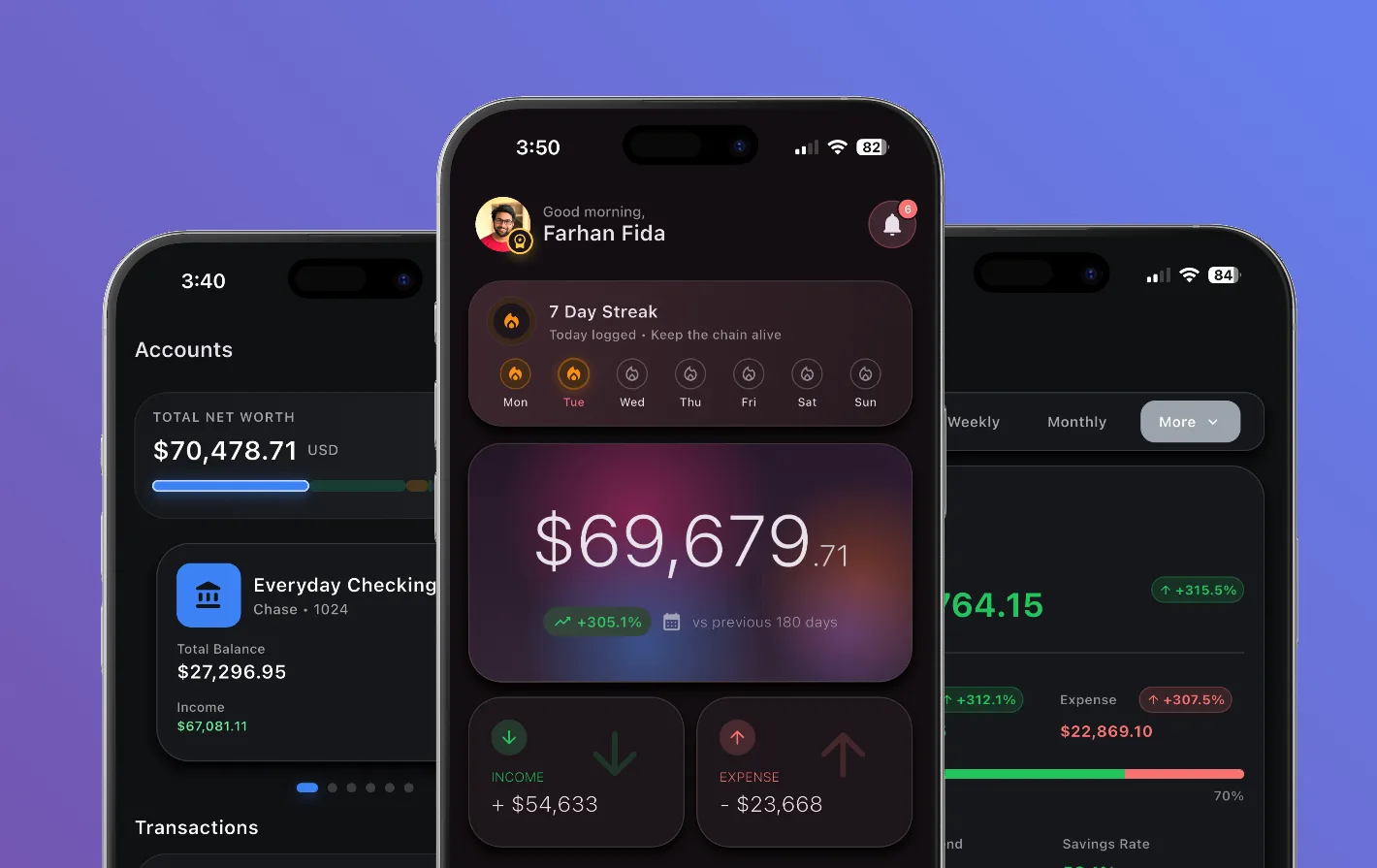
The overview brings balances, cash flow, recent activity, and the next useful action into one calm view.
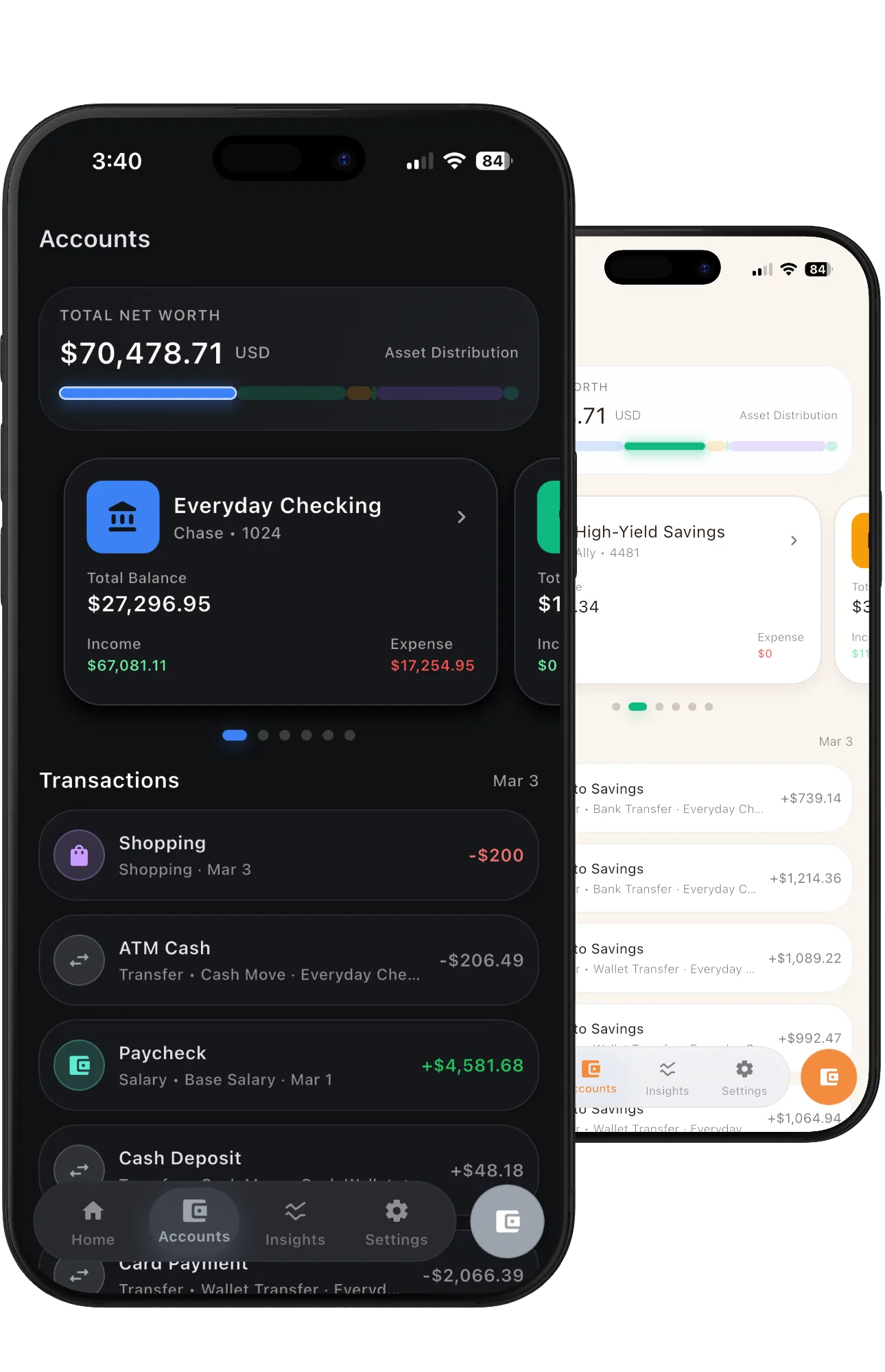
Accounts show where money is held, while transactions keep the detail needed by budgets, reports, and insights.
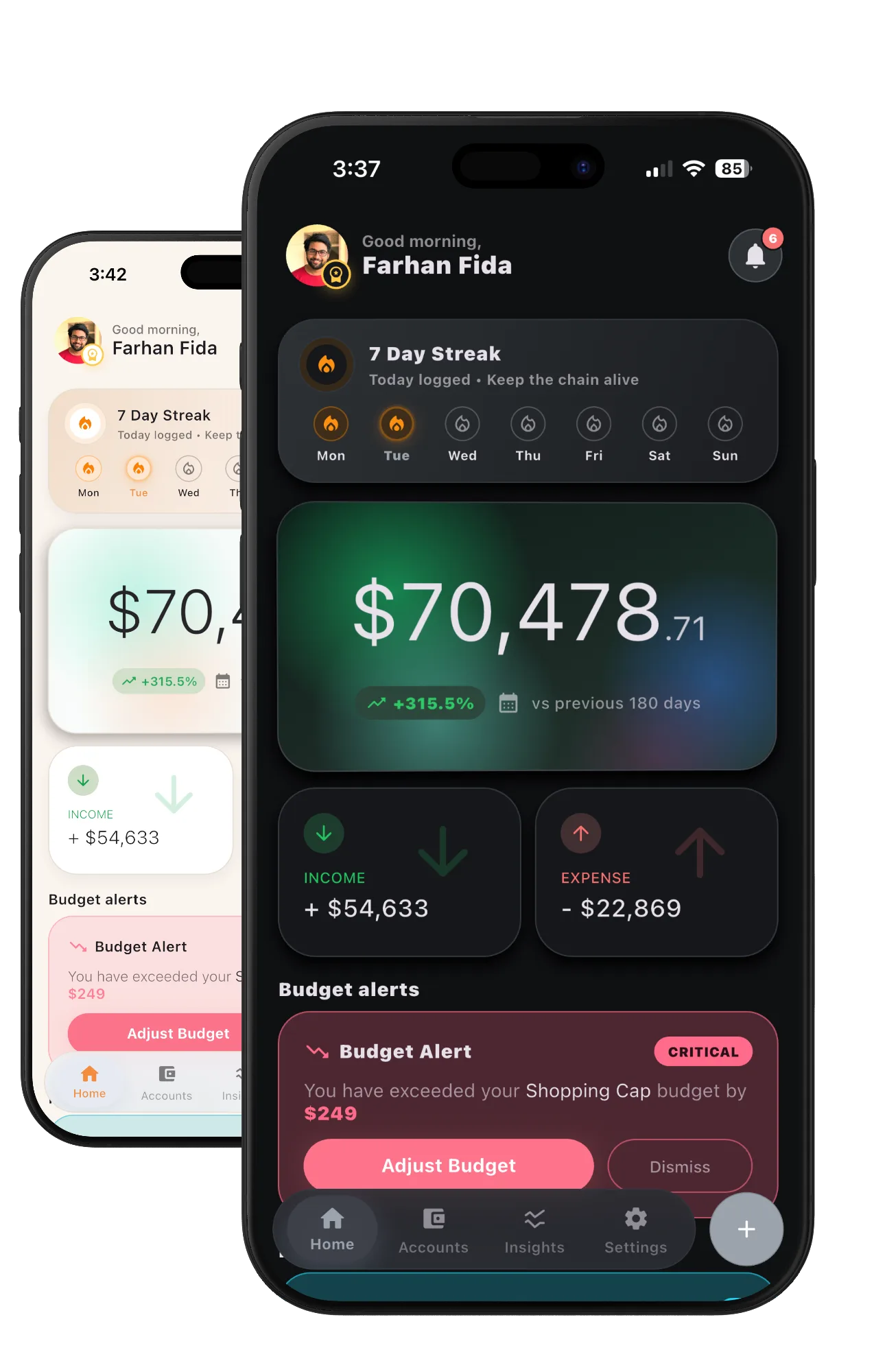
Light and dark home views show balance trends, income, spending, budget alerts, and daily progress.
Cires connects daily entries with accounts, budgets, goals, recurring payments, rates, reports, habits, widgets, profiles, backups, and personal settings.
The app and website share one idea: individual moments become useful when people can see the pattern behind them.
Together, the app and website turn money tracking from a list of entries into a steady habit of paying attention.
What we delivered
Start a project
Share the product, the current stage, and the support you need. We will reply with practical next steps.
Start a project