
Stores
Each seller keeps its own identity inside the shared marketplace.
A familiar way to shop from local stores in one app.
What we made, why it mattered, and how it came together.
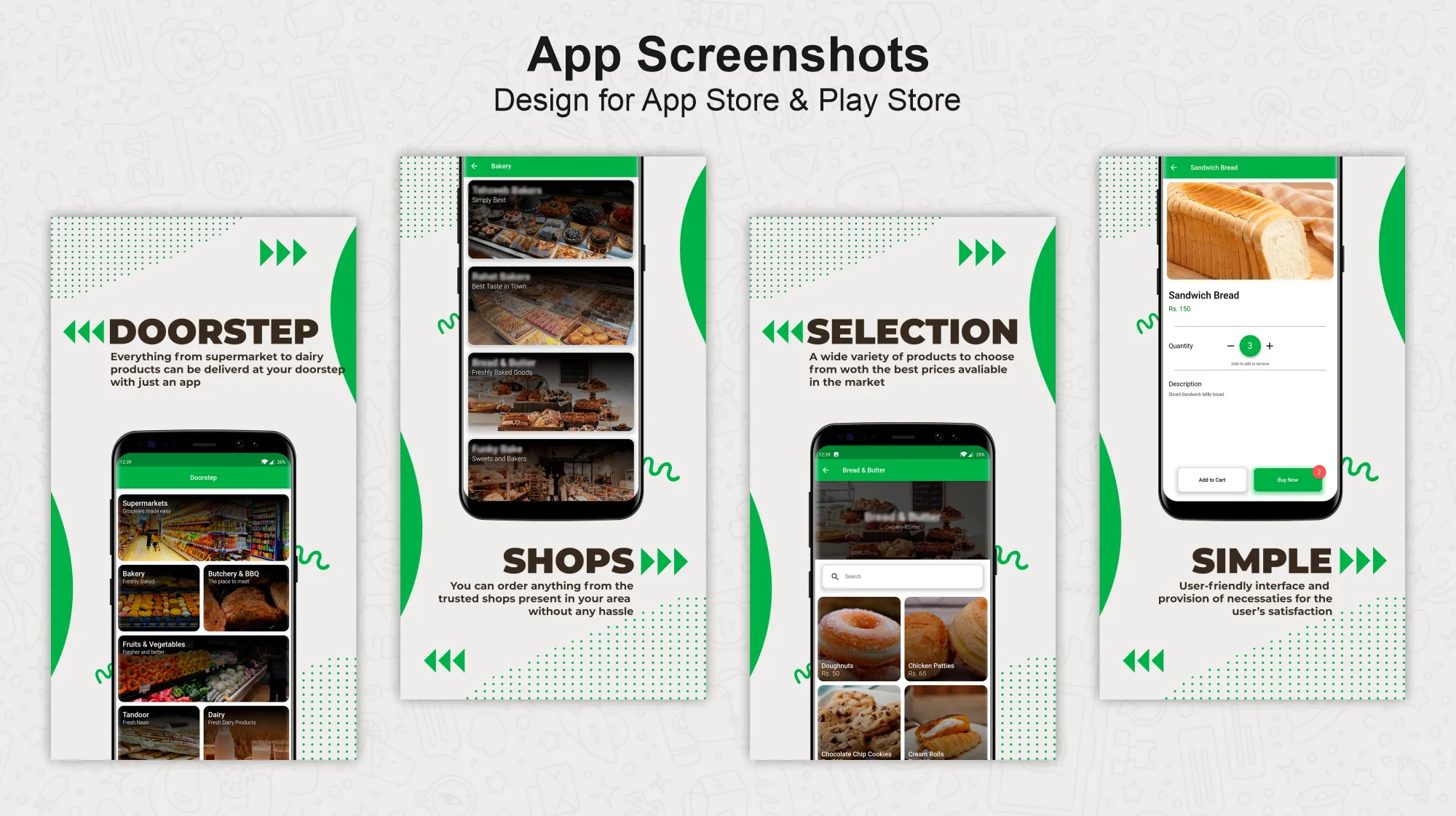
Doorstep brings supermarkets, bakeries, butchers, produce shops, and other local sellers into one mobile marketplace.
We designed a simple path from choosing a type of shop to finding a product, setting the quantity, and placing an order.
Each seller keeps its own identity inside the shared marketplace.
People can start with the kind of shop they already know.
Price, quantity, and the main action stay close together.
The path from browsing to checkout is easy to follow.
Fresh food, bakery items, household goods, and meat all need different product details and quantity choices.
We needed a consistent shopping experience that still felt connected to the individual seller.
What we had to balance
One marketplace and distinct stores
Fast shopping and useful product detail
Fresh goods and clear quantities
Large choice and simple navigation
Our approach
People begin with a shop category, choose a local seller, and then browse that store's products. Search offers a faster route when they already know what they want.
Price, quantity, availability, and buying actions stay together so the next step is always clear.
Want a fast route to everyday items.
Want to compare products from different local sellers.
Need their store and products represented clearly.
Start with groceries, bakery, meat, produce, dairy, or another category.
Browse local sellers in that category.
Move through the store or search for a specific item.
Review the image, price, details, and quantity.
Choose an amount and add it with clear feedback.
Keep shopping or move toward checkout.
Each feature supports the wider experience instead of standing on its own.
Everyday categories provide a familiar first step.
A shared layout keeps shopping familiar while letting each vendor show its own products.
Images, price, quantity, and buying actions come together in one place.
The interface makes each quantity and cart change easy to understand.
Key decisions
DecisionUse shop types as the first level of discovery.
ReasonPeople often know they need a bakery or butcher before they know the exact item.
DecisionShow vendor identity while users browse products.
ReasonTrust and local familiarity belong to the seller.
DecisionKeep amount controls next to the buying action.
ReasonGrocery decisions often depend on both price and quantity.
Art direction
Product images bring the marketplace to life, while quiet surfaces keep prices and quantities easy to read.
Navigation
Category, vendor, and product pages look distinct, so the shopping path is easy to retrace.
Structure
Vendors, categories, products, prices, quantities, and cart states are kept separate so each shop can have its own catalog.
Ordering
Quantity, availability, and cart feedback are explicit so people do not add the wrong amount by mistake.
Screens and design details from the project, with a short note about each view.
The mobile journey moves from choosing a store to browsing products and placing an order.
Doorstep brings different shops into one ordering journey while keeping each vendor, product, price, and quantity easy to understand.
What we delivered
Start a project
Share the product, the current stage, and the support you need. We will reply with practical next steps.
Start a project